
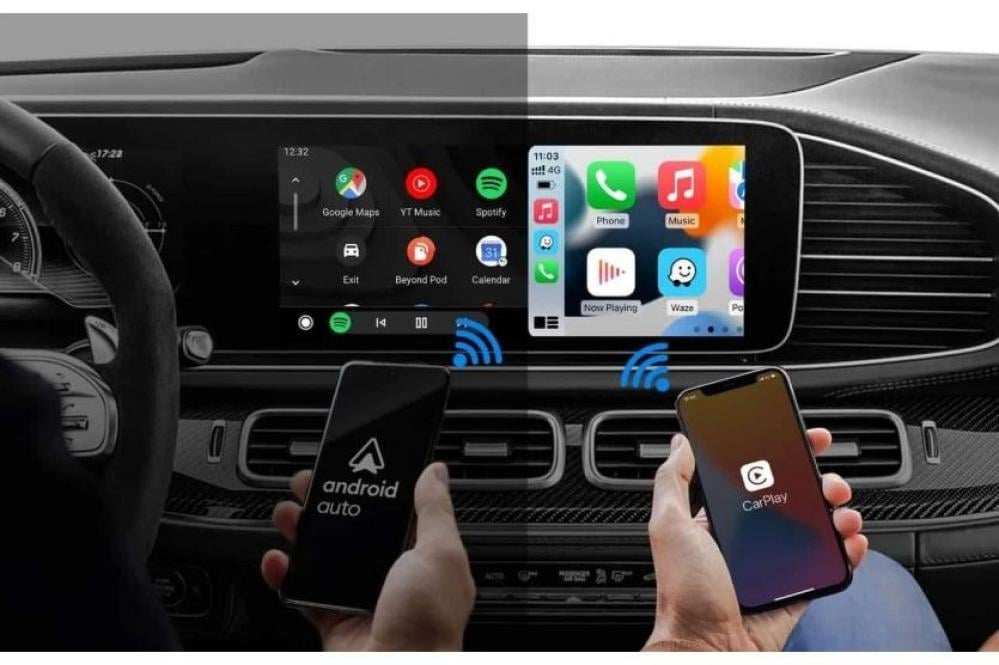
1- CarPlay and Android Auto
Apple and Android have added extra services to their mobile operating systems, allowing you to use certain software on your car's screen by connecting your phone via USB cable or wirelessly via Wi-Fi. The services currently available for CarPlay are:
a) Sending and receiving text messages.
b) Using and sharing maps such as Google Maps.
c) Audiobooks and favorite songs such as Spotify
C- Receiving and making calls from the screen.
c) Voice commands such as Siri.
Generally, cars come equipped with CarPlay and Android Auto from the factory, depending on the car model. You can confirm this with the dealer or through the Apple website. https://www.apple.com/sa/ios/carplay/available-models/
What is the difference between CarPlay and Android Auto (wired and wireless)?
Most cars use wired CarPlay, meaning you have to connect your phone to the car's screen via a USB cable. That's why wireless CarPlay devices were created; their purpose is to convert CarPlay to wireless functionality. They work by connecting your phone to the device via Wi-Fi and then connecting the device to the screen with a cable.
2- Types of CarPlay and Android Auto devices
1.2-Cut wireless CarPlay and Android Auto adapter.
The purpose of this device is to convert the car's CarPlay from wired to wireless.
Advantages:
1) Ease of use: Your phone automatically connects to the car screen without connecting a wire and quickly.
2) Multiple users: Switching between passengers' phones, for example to play favorite songs.
3) Battery percentage: Wired CarPlay hides the remaining battery percentage of the mobile phone, unlike wireless CarPlay which displays it on the screen.
4) Using the mobile phone without being restricted by a wire.
Disadvantages:
1) Connection quality: It depends on the quality and speed of the processor, but wired connections are definitely faster for data transfer.
2) Switching between phones: The phone will attempt to connect directly, so you need to turn off Bluetooth and Wi-Fi to connect to another phone.
2.2- Wireless CarPlay and Android Auto adapters for Android car screens.
The Roadmaster Wireless Dongle Smart adds CarPlay and Android Auto functionality to Roadmaster Android screens. This integrates CarPlay and Android Auto with the full Android system on the screen, making it easy to switch between them.
Available at Broadmarket and product specifications can be reviewed:
Advantages:
1) CarPlay and Android Auto: Easy connection to the mobile phone and sharing of maps on the screen.
2) Easy navigation: from the full Android system to CarPlay and Android Auto and vice versa.
Disadvantages:
1) Android version: Does not work on older Android screens, 4.4. It supports Roadmaster screens Android 4.4 and above.
3.2 - Smart CarPlay and Android Auto (Smart Box) device.
The Roadmaster SmartBox is the highest-end device in its class, offering a range of additional features and services. The SmartBox is compatible only with vehicles equipped with Apple CarPlay or Android Auto from the dealership.
Features:
A- It provides a complete Android system in the car without any modifications, just connect it to the car's USB port and the device automatically recognizes the screen.
B- Developing the agency's screen to be three systems: Android with an app store, CarPlay and Android Auto system, and the main car system.
C- Using all Android services, for example, running the YouTube application, splitting the screen into two screens, maps, etc.
E- It contains additional ports such as a data SIM card input and the ability to activate the hotspot for passengers in the car.
We focus on this product because it has different options.
Disadvantages:
1) It only works on car screens equipped with CarPlay and Android Auto.
3- Basic technical specifications of the Smart Box device
1-The processor.
The processor is the main machine of electronics, and the processor determines the speed of the device, internal memory, operating system versions, and more.
Among the most famous and powerful processors are those from the American company Qualcomm.
All Roadmaster Smart Box devices are equipped with different Qualcomm processors.
2-Memory
The devices come with storage capacities such as 2, 3, 4, 6 and 8 GB RAM, and from 32 to 128 GB internal memory.
Here, RAM is used to store main files such as applications and affects the speed of the device, and internal memory is used to store audio or video files, etc.
3- Available outlets
-Data SIM card: To run the internet directly on the device and allows the car's passengers to use a hotspot.
- Memory slot: For inserting and storing SD memory cards
HDMI port: To connect the car's rear-mounted screens to the device.
Remote: An additional accessory for cars without a touchscreen control panel. The remote is also wireless.
4- Quick summary
1. The devices currently available are for cars equipped with CarPlay or Android Auto, and their types vary in terms of use:
a) Converting the car's CarPlay from wired to wireless.
b) Adding CarPlay to an Android screen.
CAR-102
c) Adding a full Android system to the factory screen with CarPlay or Android Auto
RM-C82 RM-C48 RM-C38
2. Make sure that the CarPlay device is working and that it is compatible with the mobile system version.
3. The processor, speed, memory, and ports determine the product price for Android Smart Box devices.
4. It does not affect the car's warranty and does not require installation, just connect the wire.
5. Roadmaster devices come with a two-year warranty.
Please rate