
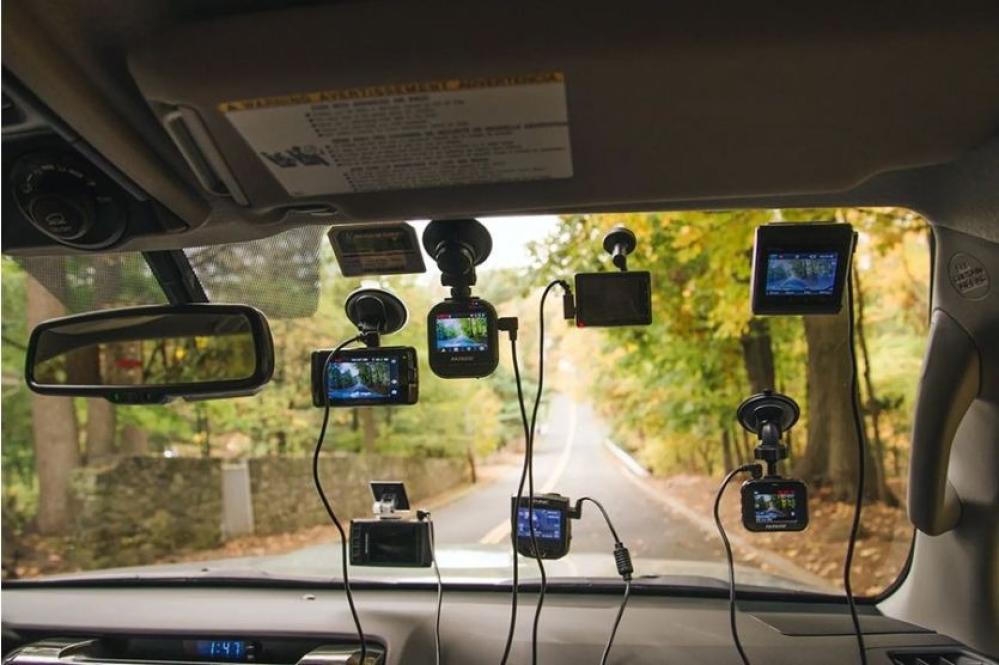
1- Why do you need a dash cam?
The dash cam is designed for use in cars to document trips by saving footage in case of accidents, protecting the car during downtime, and benefiting from proving insurance company compensation or proving violations. You may also encounter funny, unforgettable moments.
Dash cams have recently become very popular, especially with the spread of e-commerce and fast international shipping. Dash cams come in different sizes and specifications; some have a microphone to record sound inside the car, and others are equipped with ADAS safety systems, night vision lenses, and more.
Dash cam prices vary not only due to differences in specifications, but quality and lifespan also play a major role in determining the price.
2- Choosing the right dash cam?
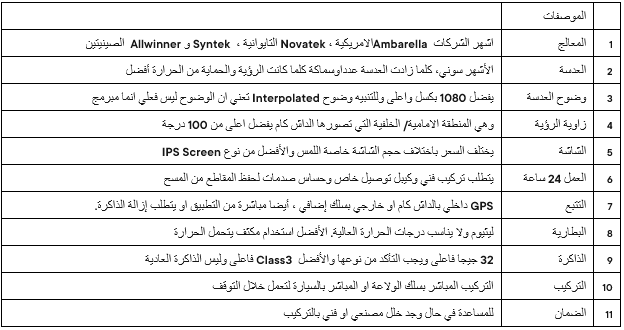
Determining the appropriate budget for purchasing a dash cam depends on your needs, and below we list the most important specifications that affect the price.
3- Advantages and disadvantages?
Here we explain the differences between Wi-Fi, Bluetooth, and data SIM dash cams. When a user wants to view image or video files, there should be a better way to connect to the dash cam instead of removing the memory and viewing it on a computer.
It is automatically assumed that Wi-Fi is the internet, but in reality, Wi-Fi is a means of communication like Bluetooth for receiving and transmitting. With a dash cam, Wi-Fi is better because it is faster than Bluetooth, so the mobile Wi-Fi can be connected to the dash cam to view and download gallery files of photos and videos and share them easily.
Because Wi-Fi and Bluetooth coverage is limited, a data chip is added to the dashcam to allow remote tracking of the dashcam and vehicle from anywhere. This is its most important feature, in addition to the ability to review previous footage and, in some models, communicate with the driver. It requires an unlimited internet subscription and a tracking software subscription, and the resolution is generally lower than other types.
4- Explanation of usage and frequently asked questions?
1) How is a dash cam installed?
The dash cam is installed in two ways: either by using a power cable to connect to the cigarette lighter or by direct connection to the fuse box. It requires a specialized technician, so look for a professional center to avoid technical problems later.
2) Is it possible to monitor the car while it is stationary without the engine running?
Yes, the dash cam must support parked recording and have a dedicated connection cable. In this case, the dash cam will record continuously while parked as a time-lapse video. If a shock sensor is present, the files will be saved to the memory.
3) Can any type of memory be used?
It is recommended to use Class 3 memory or higher, or as specified in the instruction manual. You may later experience problems with video quality or distortion.
Memory size depends on the shooting resolution and the number of cameras, and 64 GB or higher is preferred.
4) What is the purpose of the shock sensor and the emergency coil?
The dash cam works by continuously recording, automatically scanning and recording new clips when the memory is full.
Therefore, the shock sensor works in case of car vibration by saving the clips in a protected emergency file for later reference without deletion.
5) What is the benefit of using a dash cam?
It varies depending on the type. Using the application, you can also view the files and modify some dashcam settings such as shooting resolution, shooting file size, etc.
5- Quick Summary
When searching for the right dash cam for your car, make sure of the following:
1- The processor is heat-resistant and can record at FHD1080 resolution and above.
2- Number of cameras and night vision feature
3- Installation can be direct or indirect with original connecting wires so as not to affect the car battery, and it is preferable to use hidden wires.
4- The application for browsing, easily sharing, and downloading videos
5- Warranty and, if possible, try it before buying.